Category Archives: tech

Refill


layout: post

title: Refill

My Fisher Space Pen leaked; the brand's legendary status is in jeopardy! Aaaaaaaaaaaaaa!

(Think calming thoughts Baz…)

On Tuesday I dropped my pen, thought nothing of it.

On Wednesday I noticed excessive smudging (I'm left-handed.)

Today I got my magnifying glass out after a particularly nasty blob of ink appeared on my planner. And transferred to my finger. And highlighter pens. A blob of ink that even after half a day resisted all attempts to cover by careful applications of white paper from an on-a-roll dispenser.

Now the magnifier is ordinarily almost useless, having a too-small, rectangular, lowish powered main glass and a tiny ancillary, but insanely-powerful inset magnifier. It's with this second, a lens having an extraordinarily shallow focus depth, that I found the end of the pen refill had split.

When it dropped, all-of 73cm onto industrial-strength office carpet, it must have impacted something hard-enough to break one side of the ball retaining sleeve.

Unprecedented.

Yes, I have got a spare refill.

Phew!

It – a fine point replaced by the new-year medium black – is about to run out.

Living on borrowed time now; it's probably the most excitement I'll have all week.

Let's face it, at work on an otherwise-unremarkable day, I managed to defeat the very best American engineering – a pen designed to write in zero-G, upside-down, underwater, in extraordinarily hostile environments – by dropping it on the floor.

Danger, it follows me everywhere.


Addendum:

It's a myth that the Americans spent squillions of dollars developing the pen whilst the Russians used a pencil. Snopes.com link.
Backups

I have a NAS – a network-attached-storage device. Bought to serve photos and video and music to the family and cut our reliance on cloud storage, it has of course failed to live up to its potential.

There are a few photos and songs and videos and a few documents and, well, not much else. The usable Internet speeds we have now, our Amazon Prime video subscription, and the ready availability of girl-friendly entertainment on YouTube, they all conspire against my original vision of an all-encompassing media server.

It’s appropriate to note that most of our irreplaceable files are also stored at a couple of cloud storage providers.

“…most of…”?

Yeah.

So, regular backups of our important stuff? Every now and then I make backups from our laptops. But, thus far, not automatically.

What I’m looking for is a program that’ll run silently on our Windows laptops*; a program that’ll take whatever exists in a user’s folders and put it somewhere safe.

Now I know this bit sounds obvious, but I don’t want to have to leave devices on and wait for a timed schedule to start the backup process. This has to happen seamlessly, in real time as the files are manipulated.

Moreover, whatever I get must not lose files deleted from a users computer from backups after 30 days. That knocks both saving stuff into Dropbox folders and making Backblaze backups from my list.

My frontrunners so far are Arq and CrashPlan. Both are probably overkill for our needs, but have solid reputations.

I’d appreciate any advice from existing users, along the lines of:

  • Which service/program is the most unobtrusive and reliable for you?
  • Which cloud storage services are easy to setup with the program, and have the ‘best’ uptime? Amazon Glacier might be cost-effective but I’m really not keen on waiting hours to get our stuff.

Of course my shortlist candidates have, or will soon have, the attraction of their own storage. 250GB right now seems right, whereas ‘unlimited’ is far, far beyond our likely needs.

Oh yes, I want to utilise the NAS too for automatic backups.

This is but the start of a journey.


*We’re not made of money; only one laptop was bought new, the rest were acquired as a result of family generosity. The new one? Sale price.

Developing

I may have mentioned my programming days are >30 years in the past? Well they are. It's not to say I haven't dabbled in the last few years. Because I have.

My GitHub Pages site is a prime example; personal, trivial, offering not much mass-appeal; yet requiring a fair degree of time and patience to create.

And I've learned new skills too!

My pages are hosted at GitHub.com; the design (the technical aspects, not necessarily how pretty it looks) is based on a forked version of the poole/hyde repository (repo.) This is where the more in-depth instructions are located. Essentially it's a Web site in a box, free from the shackles of self-hosting and server security concerns.

Getting it personalised in the first instance was surprisingly easy. Take a look at http://github.com/bazbt3/bazbt3.github.io for my site's files.

I'm assuming here that you want to create a new site and want to do it the easy way, as did I. There's a learning curve of course, but there's no compelling reason to step outside the GitHub.com site along the way.

The executive summary:

  1. Login to your GitHub.com account. You may need to create one for this step to work best!
  2. Find and fork the 'poole/hyde' repo, calling your fork [your GitHub username].github.io –
  3. Remove the entry (all the text) in the CNAME file and save it back to your repo. This forms one half of a redirect from a domain external to GitHub Pages.
  4. Customise the fields within the _config.yml file and save it. This effectively personalises the new site.
  5. Edit the post within the _data folder. This is to test whether the basics are working.
  6. Browse to [your GitHub username].github.io – and you should see something superficially like poole/hyde and my sites, but with your content.
  7. Fix anything that doesn't quite work.
  8. Success!

If you don't see what you like, it's not a massive amount of work for anyone with any previous programming (at any level) or HTML background to work stuff out. Knowing a bit of Markdown – to edit and format your posts – will help.

I've changed stuff and added a few things to the basic 'framework', such as:

  • Changed the site name font (I know a tiny amount of CSS, not enough to break stuff, but I always do and have to revert.)
  • An 'Archive' page, basically a copy and paste from the jekyllrb.com site, but formatted to add post excerpts.
  • A 'Reading list' page, a simple loop reading data from a .csv file.
  • Other stuff.

Once you get into this, the ideas flow quickly.

But, despite all this enthusiasm, faffing about… my primary blog still resides at Jason Irwin's 10Centuries – here.

Why?

Because there's more to blogging than fiddling with site nuts and bolts, SEO, testing, etc. – it's all about the writing for me.

Besides, 10Centuries v4 is due soon (currently in invite-only beta) and that's an entirely different ballgame!

Despite my what it states in my App.net bio I am #NotADeveloper.

But it helps to have a basic understanding of what it takes to be one.

A clear mind.

ADNHackDay

App.net's @lukasros asked a couple of days ago:

"Hello people of App.net! What do you think about having another #ADNHackDay / #CommunityHackDay?
Pinging @matigo @33mhz @duerig @ryantharp @flashblu @adnfuture @pamdavis @jvimedia @cgiffard @blumenkraft and everyone else."

The weekend of January 30/31 has been proposed. And I'm vaguely excited!

"Vaguely" because, as you're probably already aware, I'm not a developer not even a hobbyist coder. It didn't stop me creating a thing that came to its ultimate* fruition only after the weekend I participated. But it was good to watch the evolution of stuff and, though I'd imagine there's no substitute for being in the same room as people working feverishly to complete a hack, it was good enough for me.

No, I don't know what I'm going to do, or what I'm capable of. And that's what the inspiration of a community of like-minded, though far better than me at their fields, people will imbue in me. Confidence. Or fear, too early to say.

Or… I'll just read the recap. Dunno yet!


*It's really not that good. And it has the niche-cubed appeal factor.

Layouts

I have a Github Pages test blog, adapted from a repo I found on Github.com. It's there simply to allow me to figure out how Git & Github work, to refamiliarise myself with basic HTML (and with Jekyll/yaml code), and to extend my very rudimentary knowledge of CSS.

The theme I chose for the site purports to be responsive to screen orientation and size: landscape with a sidebar, portrait a top bar.

But no.

When viewed on my 4.6 inch phone in portrait orientation it looks quite nice. When viewed in my 7 inch tablet in landscape orientation it also looks quite nice.

App.net's @hazardwarning was kind enough to alert me to a worrying thing:

When viewed on her tablet in portrait orientation, the sidebar obscures half of the content; an effect I can replicate it on my tablet. When I view the site on my phone in landscape, the same behaviour is very much in evidence.

Ahhh… a challenge!*

I'm pretty sure I can fix it if I restore the original 'hyde.css' file in \public\css; a file I edited (inexpertly, it has to be said!) in a successful attempt to reduce both sidebar impact and vertical white space.


*Damnit, I very nearly inserted a smiley face then!

Knife

During 2000 I visited the USA on an escorted coach tour. Part-way through we stopped at a tax-free shopping outlet; not a mall but one of those unpreposessing, drab buildings, the exteriors of which belie their contents.

I looked around for a while and, almost in desperation, bought a grey SwissCard – this newer variant on the Victorinox site is almost identical, save for the case material.

It has just enough tools to be useful whilst being thin enough to fit in my wallet:

  • nail file,
  • screwdriver,
  • toothpick,
  • tweezers,
  • pen,
  • pin,
  • blade,
  • scissors,
  • measuring scale along the side.

Though the knife is around 15 years old and though I've looked after it, it's never been sharpened since new. Which makes all the more remarkable the fact that today I stripped the wires in an extension reel cable, to repair it after our otherwise-delightful Ruby dog chewed right through the insulation.*

If only everything lasted as long.


*She's fine, it wasn't live!

Git

I have absolutely no desire to learn command-line Git; the available GUI-based tools are more than sufficient for me, and especially that installed on my Android phone.

I'll let that sink in…

I use the really rather good Pocket Git, allied with its companion text editor DroidEdit. The only thing it seems to be missing, for this novice at least, is 'Issues' support.

Besides, github.com has, in theory, that and everything else I need. (But I have the ForkHub app anyway.)

Having a Git app on my phone, and working with a tiny amount of text visible above the virtual keyboard, might seem silly. But, I need no Internet connection to work on my stuff – not, that is, until it gets to a push.

Incidentally, DroidEdit isn't a text editor. It's a source code and text editor with syntax highlighting, and has support for "Dropbox, Drive, Box, (S)FTP servers and Git."

I haven't given anything Baz's Seal of approval recently. Pocket Git and DroidEdit both get awards.

SVG

I attempted to create an SVG file suitable for my test blog at bazbt3.github.io (or here if you’re reading it as a test!)

I’ve had partial success, but only in producing an image in the footer that links to my App.net (ADN) profile. (It’s why I started this.)

Rather than attempting a search I asked a question:

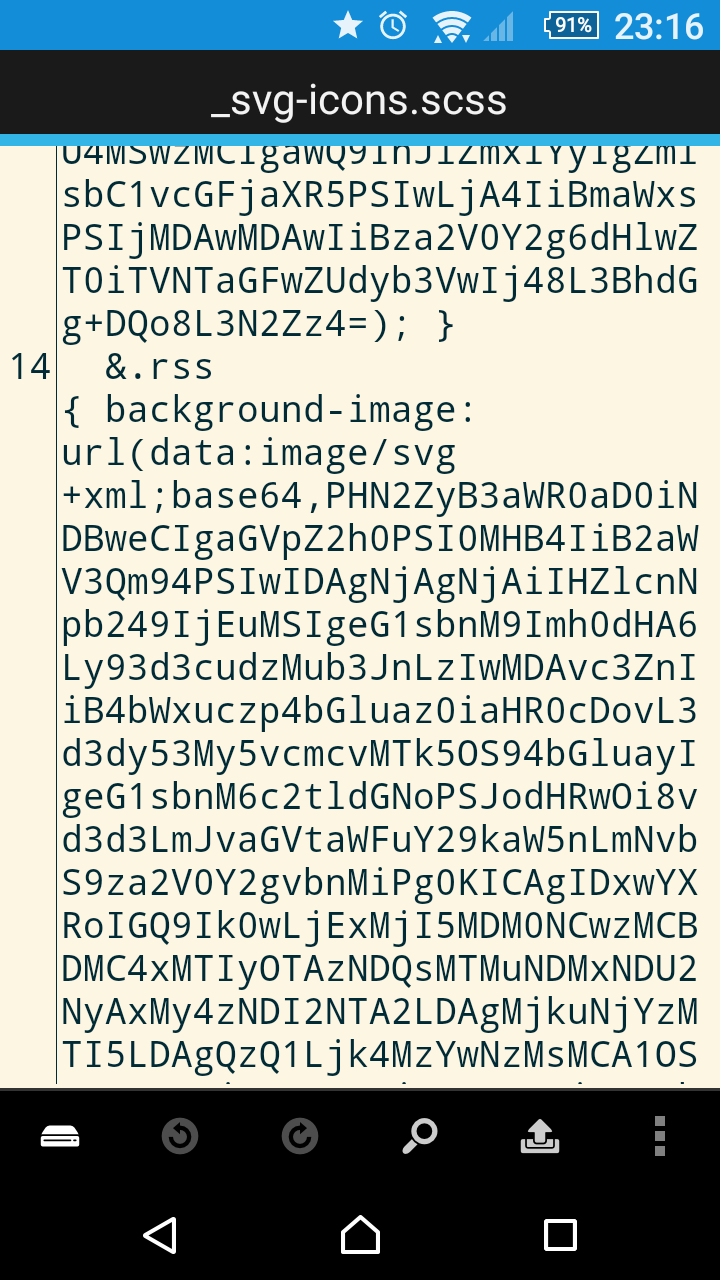
Bit of a longshot, this. Do any of you have an SVG version of the ADN icon, pastable into an (s)CSS file? Here’s an example of what I see for an RSS icon in a test I’ve been fiddling with, a text screenshot first:

An answer came quickly (thanks Barbara!):

@logista: @bazbt3 I don’t have one, but I found this one [simpleicons.org]

Looks great!

Unfortunately, it’s not in the same format as the rest in the file. No matter, I’ll search, an online converter won’t be hard to find, all I need is to get a smallish file, a file with a header looking a bit like…

  &.dribbble      { background-image: url(data:image/svg+xml;base64,PHN2Zy… 


In not-quite-desperation I eventually settled on one that produces a base64 jpeg instead of the SVG. One which obviously overfills the container it’s supposed to fit in.

Looks a bit crap.

But hey, it’s a test, right?

Computer book required

I don't read enough. I bought 3 novels a few months ago with the intention of making time. Of course it didn't work! To help speed things along I'm thinking of narrowing my focus somewhat – to something I'm certain can start this process off. At the dawn of the UK's home computer revolution I bought a book about computers.

A key phrase from it still resonates: something like "computers are fast rule following idiots", then the obligatory "garbage in equals garbage out." It seems that those words are both truer than ever and at the same time subject to disproval based on what we see every day. But that's a topic for another time…

I'd like to re-acquire a copy of the book.

A quick trawl through the histories of various computers and computer companies from that era indicates a publishing date after 1977, and before 1982. It's a fairly big window given the massive progress being made at that time, so how can I be sure?

Well, 1977 as I'm certain the Tandy TRS-80 was mentioned in the book, as was the Apple ][. 1982 because when my first computer (a 1K RAM Sinclair ZX81) arrived my focus narrowed from the previous theoretical 'what if' to the more practical 'eeek, what now?!'

I wonder, can you help me find it?

Some help:

  • It's heavily slanted towards the U.S., relating to both that country's computing history and its then-contemporary devices. That's not surprising.
  • It has a picture or a photo of a computer on the front.
  • The colour beige or orange features predominantly on the cover.
  • it's the same size as a thick novel.
  • Er… I know it's not much help!

So, how about it? Have you got what this quest needs?